
Phone Clean Fix
Mr.Appp.86Tools
4.53.17K Reviews
- Version
- 1.1.3
- Installs
- 5.00M
- Age Rating
- Everyone
Screenshots
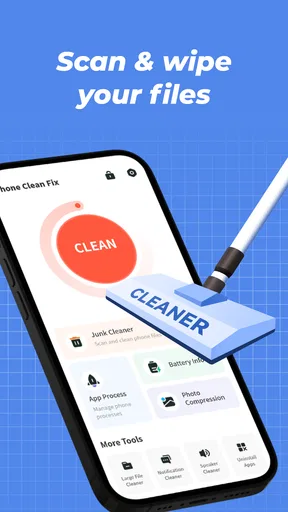

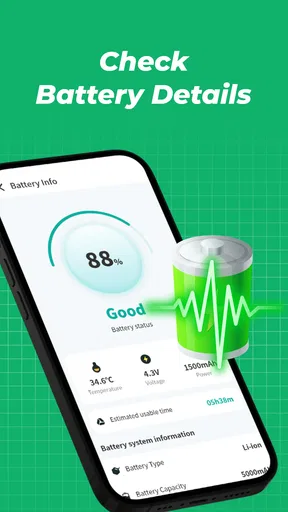
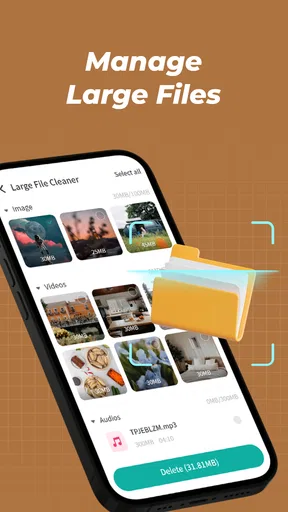
Our Review of Phone Clean Fix
 Analysis by Appyee
When a phone starts feeling sluggish, it is tempting to install a cleaner and hope one tap will fix everything. I prefer a more practical expectation: a cleaning tool is most useful when it helps me find clutter and make a deliberate choice about what to remove. Phone Clean Fix is a free Android tools app from Mr.Appp.86, and its appeal is that straightforward housekeeping is meant to feel approachable rather than technical. It is rated for Everyone, has an average rating of 4.5 from around 25,000 ratings, and has been installed over a million times.
A cleaner is most useful when storage is the real problem
For me, the most valuable idea behind a phone-cleaning app is not a dramatic promise to transform a handset; it is the chance to review space-consuming clutter without digging through every folder by hand. That makes a cleanup tool particularly useful when I am close to running out of room and need to decide what can safely go. The practical benefit is easier housekeeping, not a guarantee that every phone will become faster.
That distinction matters because “slow” can mean different things. A phone may feel bogged down because storage is nearly full, but it can also be affected by an older device, a demanding app, or a weak connection. Clearing unwanted files may help with the first situation. It cannot make a network faster or turn old hardware into new hardware, so I would treat a cleaner as one small part of troubleshooting rather than a cure-all.
How I would fit it into a sensible routine
I would start a cleanup when I have a reason, such as needing room before saving photos or installing an app, rather than repeatedly clearing things just because a cleaner is available. I would review what the app identifies before removing it, especially if I do not recognize a file or rely on an app that stores temporary information. A little caution is worthwhile: cached data can often be recreated, but removing local files without checking may have consequences for how an app behaves or what remains available offline.
A useful habit is to check the phone’s own storage controls first if I need to identify exactly what is taking up space. Those controls can give a more direct view of individual apps and their stored data. A cleaner can be a more convenient starting point for general tidying; the built-in settings are the better choice when I want precise control. I would use the two approaches as complements, not assume that one replaces the other.
What Does Phone Clean Fix Do?
Alright, so Phone Clean Fix is all about tackling those pesky problems that slow your phone down. From clearing cache to managing those sneaky background apps, it’s designed to give your phone a little extra oomph! You know, it’s like that friend who always helps you declutter your room when it’s a mess.
Features That Stand Out
First up, the junk file cleaner is a game-changer. It finds and removes unnecessary files that are just taking up space. You’ll be surprised at how much room you can free up! Plus, the app has a memory booster that helps speed things up by closing apps running in the background. It’s like a breath of fresh air for your phone’s processor.
Another cool feature is the battery saver. It optimizes your phone’s battery usage, so you’re not constantly hunting for a charger. I mean, who doesn’t want their phone to last a bit longer, right?
Using the tools without expecting miracles
In practice, I would judge a cleanup by whether it solves a specific annoyance: freeing enough space for a download, making room for a batch of photos, or helping me get through a busy day without stopping to sort files manually. I would not treat a memory-cleaning action as routine maintenance that must be repeated every few hours. Android manages background activity itself, and closing apps can mean they have to load again when I return to them. For an app I use constantly, that trade-off may be less convenient than leaving it alone.
The same measured approach applies to battery tools. If a particular app is draining power, checking the phone’s own battery settings can help me identify it and decide whether to limit its use. A battery-saving option is most useful as a prompt to pay attention to consumption, not as a substitute for understanding what is using power. If battery life is poor because the device is old or the screen is being used heavily, a cleaning app cannot remove that underlying cause.
My less obvious tip is to make cleanup a decision point, not an automatic reflex. Before I clear anything, I would consider whether I need the data soon, whether a download is waiting, and whether I know what the item belongs to. If I am preparing for a trip, for example, I would check offline maps, music, and other saved content before removing files. That small pause reduces the chance of freeing space at the cost of losing something I meant to keep.
User Experience and Interface
Now, let’s talk about the user experience. The interface is super intuitive. Even if you’re not a tech wizard, you’ll find it easy to navigate. Everything is laid out clearly, and the app guides you through each process without overwhelming you with tech jargon. It’s like having a tech-savvy buddy right in your pocket.
Where it fits among the usual alternatives
Phone Clean Fix is aimed at people who would rather use a focused cleaning app than work through several storage screens themselves. Compared with manually checking each app in Android settings, a cleaner can feel like a simpler first pass; compared with file managers, it is a more task-focused option for tidying rather than organizing folders one by one. I would still turn to Android’s built-in controls when I need to know exactly what is stored by a particular app, and to a file manager when I want to inspect or move specific documents.
That difference also helps set expectations about privacy and control. When cleaning, I would read each prompt and review the items before confirming, rather than assuming every suggested removal is harmless. I would also avoid giving any cleaner more access than the task requires. This is a sensible rule for any utility that handles storage, and it keeps the convenience of a quick scan from replacing my own judgement.
A realistic moment when it earns a place
Imagine I am about to leave home, my phone warns that there is not enough room for a set of photos, and I have only a few minutes. I could use Phone Clean Fix as a quick place to look for removable clutter, then check the result and clear only what I recognize. If that does not create enough room, I would go to storage settings and review large apps or files directly rather than keep repeating the same cleanup. That workflow makes the app useful without handing it the final say.
It is also a reasonable fit for someone helping a less confident phone user keep routine tasks simple. The easy-to-follow layout described in my experience can make a basic cleanup feel less intimidating than searching through technical menus. I would still stay nearby the first time and explain what a removal means; an approachable interface is helpful, but it does not make every suggested action automatically risk-free.
Who should choose it—and who should not
I can see Phone Clean Fix working best for people who want a simple, occasional housekeeping aid, especially when clutter is making storage management feel like a chore. It is free, currently at version 1.1.2, and works on Android 5.0 and later, which makes it accessible to people using a range of Android devices. Its profile—around 2,000 written reviews alongside its rating—suggests that many people have taken time to share an opinion, though I would still decide based on whether its approach suits my own habits.
I would skip it if I already manage storage comfortably through Android settings, want detailed file-by-file control, or expect a cleaner to repair a damaged battery or fix persistent performance problems. Someone who regularly downloads large videos or keeps extensive offline content may get more lasting results from reviewing those files directly. And if an app crashes or the phone remains slow after sensible cleanup, troubleshooting that app or the device is more appropriate than running a cleaner repeatedly.
My Personal Take
Honestly, I was a bit skeptical at first. I mean, can an app really make that much of a difference? But after using Phone Clean Fix for a couple of weeks, I noticed a significant improvement. My phone felt snappier, and I wasn’t constantly dealing with lag. Plus, knowing that my battery life was being optimized gave me some peace of mind.
If you’re tired of dealing with a slow phone and want something simple yet effective, give Phone Clean Fix a shot. It’s like having a mini tech expert at your fingertips, ready to spruce things up whenever you need it!
My recommendation comes with one condition: use it to make cleanup easier, not to chase a permanently empty cache or a perfect battery reading. The best result is a phone with enough room for what I actually want to keep and fewer interruptions from clutter. For that kind of modest, practical job, Phone Clean Fix is worth considering; for precise storage management or deeper troubleshooting, I would choose the phone’s own tools first.
Verdict
Strengths of Phone Clean Fix
- Enhances device performance efficiently.
- User-friendly interface for easy navigation.
- Quick scanning and cleaning process.
- Supports multiple file formats.
- Regular updates with new features.
Limitations of Phone Clean Fix
- Contains in-app advertisements.
- Limited features in free version.
- Requires internet for some functions.
- May not detect all junk files.
- Occasional app crashes reported.
Similar Picks in This Category
View All
Google LLC4.0

Gboard - the Google Keyboard
Google LLC4.5

Google Play services
Google LLC4.3

Google Play Store
Google LLC4.9

Files by Google
Google LLC4.5

SHAREit: Transfer, Share Files
Smart Media4U Technology Pte.Ltd.4.3
Frequently Asked Questions
What is Phone Clean Fix and how does it work?
Phone Clean Fix is an app designed to optimize your smartphone's performance by cleaning junk files, managing storage, and improving speed. It works by scanning your device for unnecessary files, such as cache and duplicate files, and safely removing them to free up space and enhance overall functionality.
Is Phone Clean Fix safe to use on my device?
Yes, Phone Clean Fix is safe for use on both Android and iOS devices. The app follows stringent security protocols to ensure that no personal data is compromised during the cleaning process. It only targets junk files and does not interfere with important system files or sensitive information.
Does Phone Clean Fix require a lot of permissions to operate?
Phone Clean Fix requires certain permissions to function effectively, such as access to storage to identify and remove junk files. However, it does not request unnecessary permissions that could compromise your privacy. Always review permissions before installation to ensure you are comfortable with what the app accesses.
Will using Phone Clean Fix improve my device’s battery life?
Yes, Phone Clean Fix can potentially improve your device's battery life. By eliminating unnecessary background processes and clearing cache files, it reduces the workload on your device, which can lead to better battery performance and longer usage times between charges.
Is there a cost associated with using Phone Clean Fix?
Phone Clean Fix offers both free and premium versions. The free version provides basic cleaning functions, while the premium version includes advanced features like deep cleaning and real-time monitoring. The premium version is available through a subscription plan, which can be reviewed and purchased within the app.
